
Transfers guide for Gaming Merchants
Our Transfers feature allows you to send money from your Paystack Balance to bank accounts in your country. This feature is crucial for businesses handling disbursements, like payroll, customer withdrawals, vendor payments, etc.
Common Transfers issues and how to handle them
Transfer or withdrawal issues are among the most common and time-sensitive complaints betting customers raise. This guide covers how to investigate, escalate, and resolve these cases — whether you’re approaching the problem from your customer’s perspective or your own dashboard as a merchant.
1. Customer did not receive their withdrawal
This section applies when a customer contacts you to say they initiated a withdrawal but the funds have not appeared in their bank account.
Check Transfer Status on Paystack
Before taking any action, verify the status of the transfer from your Paystack dashboard or using webhook. The status will fall into one of two outcomes:
Outcome A: Transfer Shows as Successful
If Paystack has confirmed the transfer as successful, it means funds have left Paystack and has been sent to the customer’s bank. The bank is responsible for crediting the account.
What you can do:
Confirm the transfer details with Paystack (this may be done automatically either via transfer verification API or webhook).
Share the following details with your customer and ask them to contact their bank to trace the credit:
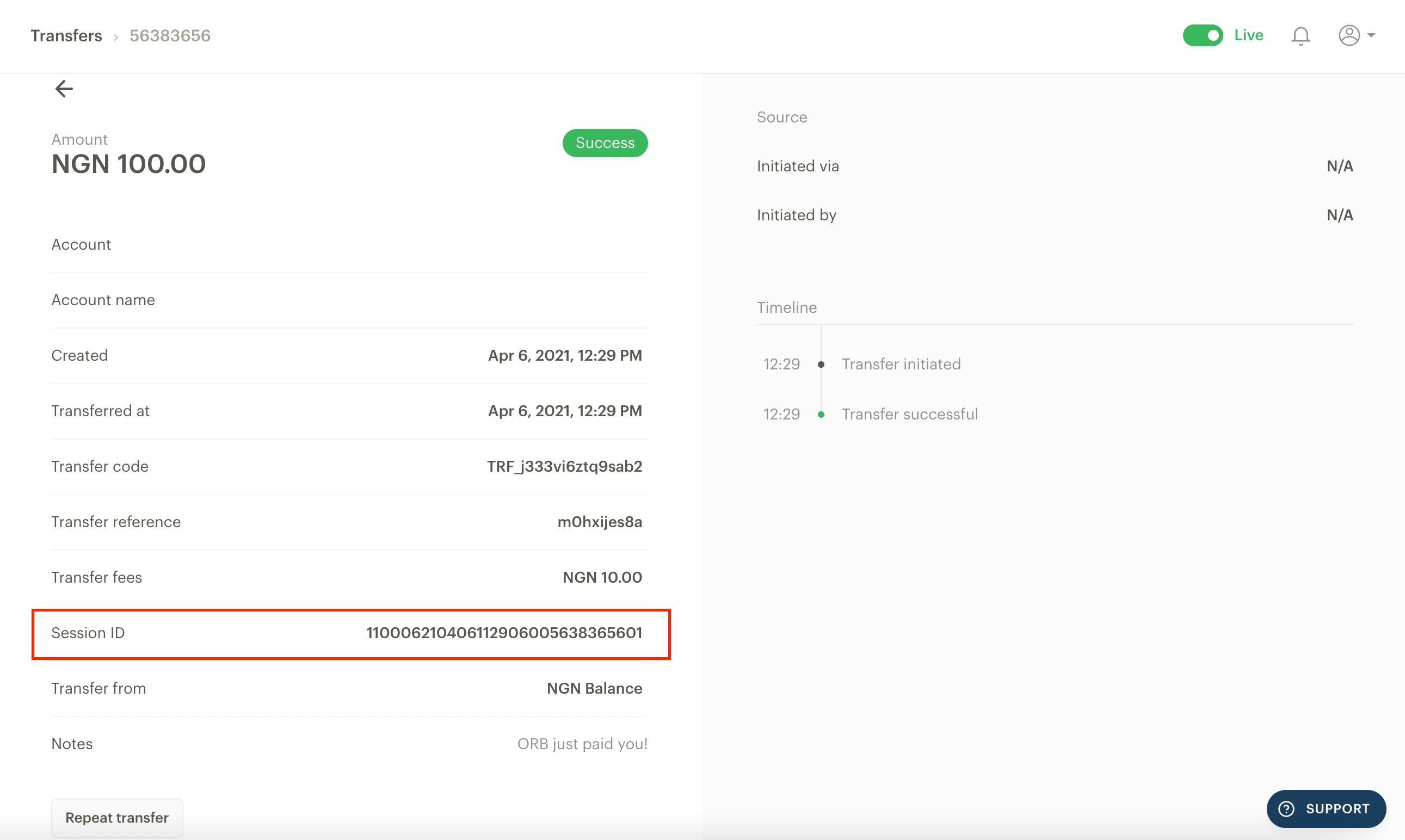
Session ID of the transfer
Exact amount transferred
Date and time the credit was sent
Banks use the Session ID to trace interbank transactions on the NIBSS network. Without it, they cannot locate the credit. Always share all three data points together.
Outcome B: Transfer Not Received Within or After 24 Hours
If the customer raises the issue after 24 hours without the funds appearing, Paystack will need to escalate to the receiving bank for a formal credit confirmation.
What you can do:
Request a bank statement from the customer covering the period from the date of the withdrawal to the date they are raising the complaint.
Scenario | The customer withdrew on the 13th and is escalating on the 15th |
Required statement period | 13th to 15th (inclusive) |
Why it matters | Paystack and the bank need to confirm the funds are genuinely missing, not delayed in processing. |
Submit the bank statement to Paystack via support@paystack.com along with the transfer reference ( gotten from your Paystack dashboard as shown below) and customer account details.
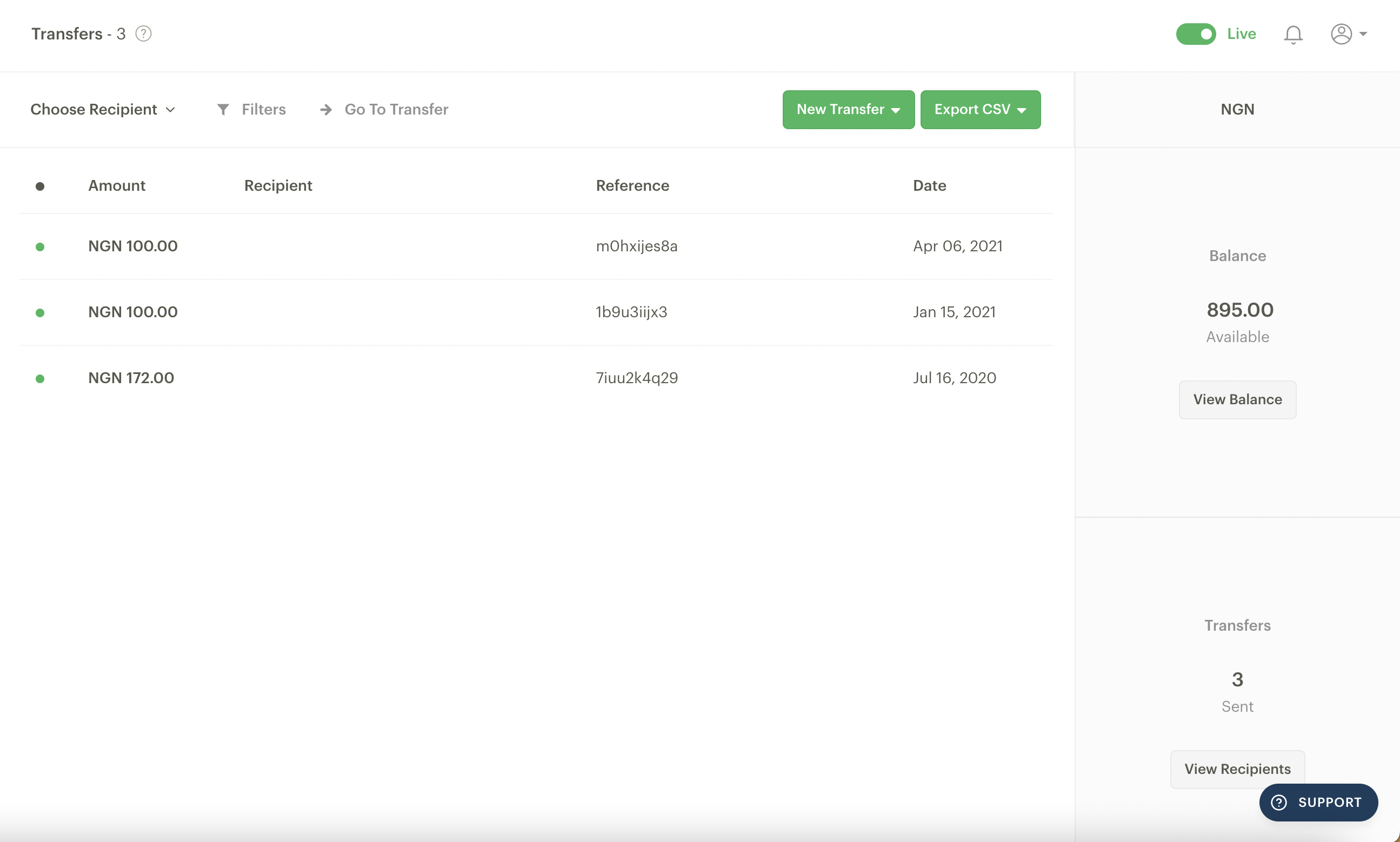
Paystack will escalate to the receiving bank on your behalf for a credit confirmation or reversal where applicable.
Remind customers to download a statement directly from their mobile banking app or visit their branch. Screenshots of transaction history are not sufficient for bank escalations.
2. Transfers Pending on Merchant Dashboard
This section applies when transfers initiated from your Paystack integration remain in a pending state for longer than expected, or when you are not receiving a final status update.
Transfer Processing Time
Under normal conditions, transfers are processed and receive a final status within a few minutes to 1 hour. If a transfer has been pending for more than 1 hour, one of the two scenarios below is likely:
NIBSS Downtime
The Nigeria Inter-Bank Settlement System (NIBSS) is the backbone of interbank transfers in Nigeria. When NIBSS experiences downtime or degraded service, transfers will queue and remain in a pending state until the service is restored.
What you can do:
Monitor the Paystack status page for any active incidents or advisories related to NIBSS.
Do not cancel or re-initiate transfers during a NIBSS downtime, as this may result in duplicate payments once the system recovers.
Wait for NIBSS to come back online. Transfers will process automatically once service is restored.
No Transfer Status Update from Paystack
In some cases, Paystack may not receive a response from the processor, causing a transfer to stay in a pending state indefinitely.
What you can do:
Retry the affected transfer using the same transfer reference number. This is critical — using the same reference ensures Paystack can detect any previously successful transaction and prevents duplicate transfers.
Wait for a minimum of 1hr to get final status: either success or failure.
If the issue is not resolved after a reasonable period, contact support@paystack.com with the transfer reference numbers of all affected transactions.
Always retry pending transfers with the same reference number. Generating a new Transfer reference for the same transaction can result in the customer being credited twice. Design your retry logic to reuse the original transfer reference until a transfer status is received.
Best Practices for Retrying a failed or pending transfer
Paystack recommends building automated retry logic into your system to handle pending transfers gracefully. Here are some guidelines:
Reference Number | Always reuse the original Transfer reference on retries. Never generate a new one. |
Retry Interval | Wait at least 5–10 minutes between retry attempts with the same transfer reference to avoid overloading the queue. (specifically for transfers that don’t have a status) |
Max Retries | Set a maximum retry count (e.g., 5–10 attempts) before flagging for manual review. . (specifically for transfers that don’t have a status) |
Final Status Check | Only stop retrying when you receive “success” or “failed” as the final status. |
Monitoring | Log all retry attempts with timestamps for audit and support purposes. |
Escalation Checklist
Before reaching out to Paystack support, ensure you have gathered all the required information. Incomplete escalations cause delays. Use the checklist below:
Customer-Reported Issues
Transfer reference number
Transfer status on Paystack dashboard (successful / pending / failed)
Session ID (for successful transfers)
Amount and currency
Date and time the transfer was initiated
Customer’s bank name and account number
Bank statement covering the period from withdrawal date to escalation date
Customer’s contact details (in case the bank needs to reach them)
Merchant-Reported Pending Transfers
Transfer Reference numbers of all affected transactions (list each one)
Date and time each transfer was initiated
Current status on your Paystack dashboard
Number of retry attempts made and timestamps
Any error messages returned by the API (if applicable)
Whether a NIBSS downtime was observed or announced during this period (this can be viewed on (status.paystack.com)
Please check the transfer section on your dashboard to view the transfer information requirements listed above. Here's an example of what this looks like for Nigeria-based businesses
Contacting Paystack Support
If you have followed the steps above and the issue remains unresolved, reach out to the Paystack support team:
What to include | • Transfer Reference numbers of affected transactions |
Response time | Paystack support will acknowledge and investigate within standard SLA windows. Complex bank escalations may take additional time depending on the receiving bank. |
Always include Transfer Reference numbers in your support email. Support tickets without reference numbers cannot be investigated and will require follow-up, causing delays.
References
You can also make reference to our other resources on transfers below: