
Transfer limits: how they work and how to manage them
What are transfer limits?
A transfer limit is the maximum amount your business can send. There are three types:
Single-transfer limit: The maximum amount you can send in one transfer.
Hourly limit: The maximum total amount you can send within one hour.
Daily limit: The maximum total amount you can send within one day.
A transfer tier determines the transfer limits available to your business. You can set each limit to any amount up to your tier's maximum. To go above that maximum, you must request a higher tier.
Example
A Nigeria-based business is on Tier 1, where the maximum daily limit is ₦100M. It can set its daily limit to any amount up to ₦100M on the Dashboard. If it needs to send more than ₦100M in a day, it can ask Paystack Support to review its tier.
These limits apply to transfers initiated from the Dashboard or through the API, including bulk transfers.
ℹ️ This feature is available only to Registered Businesses.
Tier 1 maximum transfer limits
Each new transfer integration starts on Tier 1, the default tier. The integration’s country determines the currencies and limits available to it.
Tier upgrades apply separately to each supported currency. For example, a Kenyan business can request a higher tier for KES without changing its USD tier, and vice versa. Increasing a limit for one currency does not automatically change the limits for another.
The tables below show the maximum single-transfer, hourly, and daily limits you can set on Tier 1 in each market.
Nigeria (NGN)
Limit | Tier 1 maximum |
|---|---|
Single transfer | ₦10M |
Hourly total | ₦50M |
Daily total | ₦100M |
Ghana (GHS)
Limit | Tier 1 maximum |
|---|---|
Single transfer | GHS 50k |
Hourly total | GHS 250k |
Daily total | GHS 500k |
Kenya (KES)
Limit | Tier 1 maximum |
|---|---|
Single transfer | KES 1M |
Hourly total | KES 2.5M |
Daily total | KES 5M |
South Africa (ZAR)
Limit | Tier 1 maximum |
|---|---|
Single transfer | R500k |
Hourly total | R1M |
Daily total | R2M |
Kenya (USD)
USD transfers are available only in Kenya.
Limit | Tier 1 maximum |
|---|---|
Single transfer | $2,500 |
Hourly total | $5,000 |
Daily total | $10,000 |
Your Dashboard shows the current tier and limits for each supported currency within your transfer integration. Limits and tiers may vary by market. Check your transfer settings to see the values that apply to your business.
How to change a transfer limit
Only team members with the team management permission can change transfer limits. View-only users can’t edit them.
Sign in to the new Paystack Dashboard and go to Settings → Payments → Transfers.
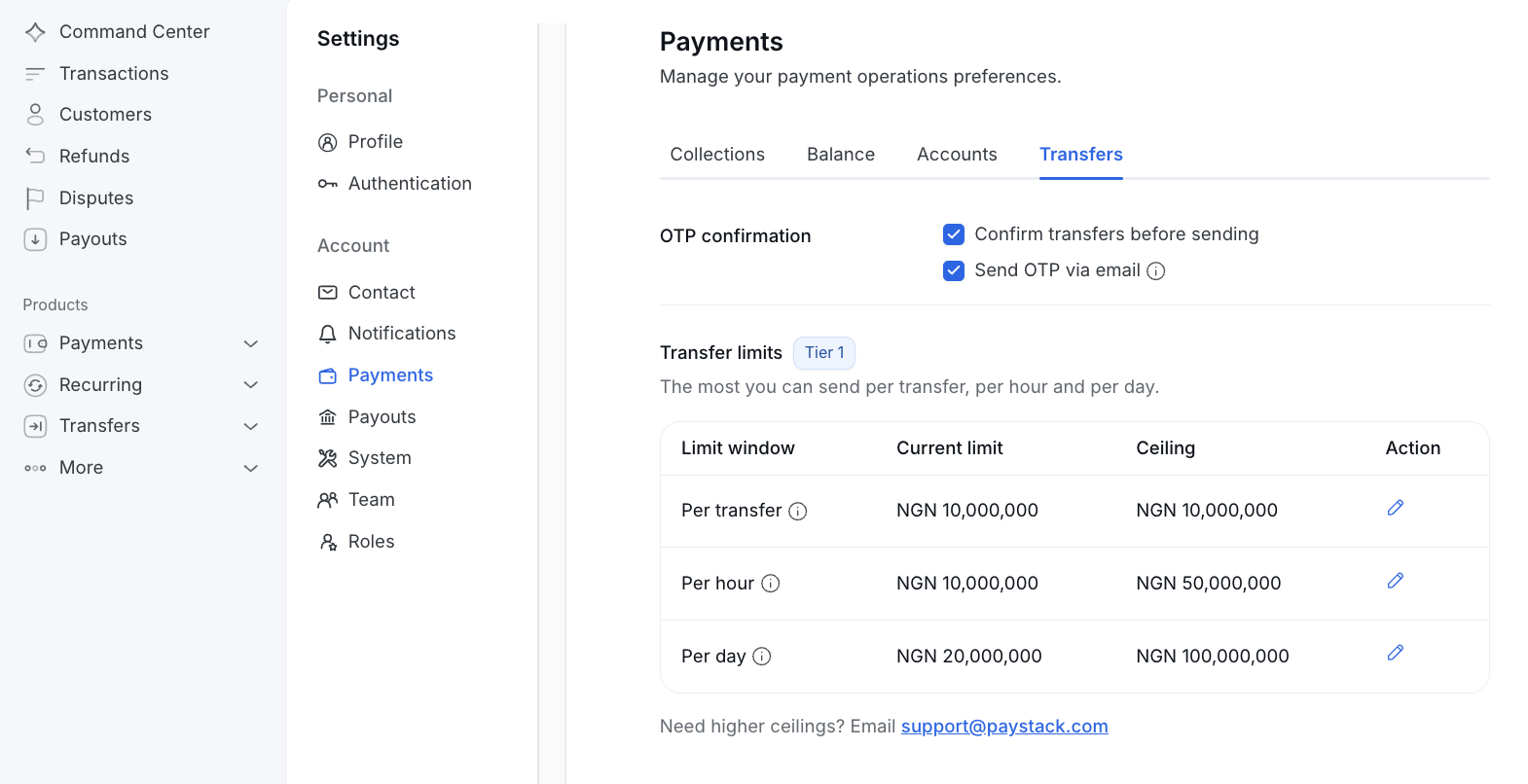
Find the integration and currency you want to update.
Click Edit (the pencil icon) beside the single-transfer, hourly, or daily limit you want to change. You can update only one limit at a time.
Enter a new amount, up to your tier's maximum shown on your Dashboard.
Review the old and new amounts on the confirmation screen.
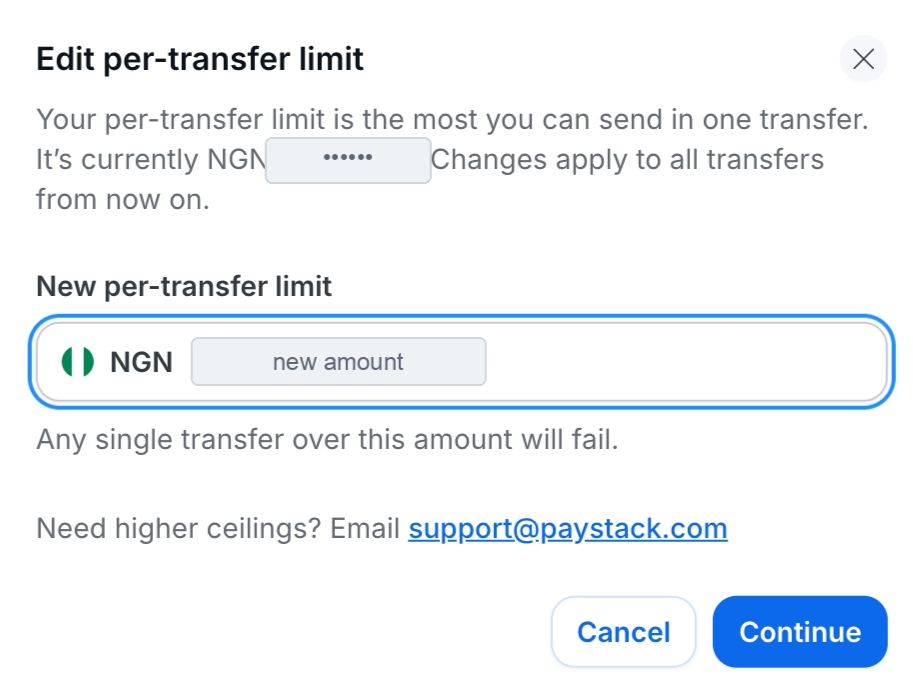
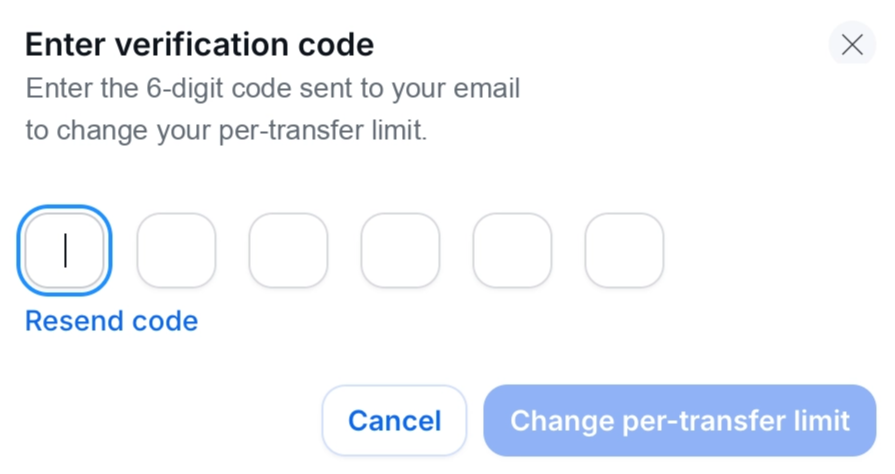
Enter the one-time password sent to your email address to confirm the change.
The new limit takes effect immediately and applies to your next transfer. For every change, Paystack sends a security notice to the person who made the change and the business owner. The notice includes the previous and new limits and the name of the person who made the change.
🔐 To change a transfer limit, you must:
Have the team management permission.
Be signed in with two-factor authentication (2FA).
Confirm each change using the code sent to your email address.
If you don’t see Edit, ask your business Admin to give you the required permission. Transfer limits can’t be changed through the API or with a secret key.
How to request a higher tier
If you need a limit above your current tier’s maximum, contact Paystack Support through any of the usual support channels, including email at support@paystack.com or the contact support form.
Specify the currency you want upgraded and include:
Your business name and Business ID
The currency
A screenshot of your current limit
The limit you need raised: single-transfer, hourly, or daily
The amount you want to increase it to
The reason for the increase
Your business must also meet the security requirements for a tier review. See Requirements for requesting a higher transfer tier for details.
What “Exceeds Transfer Limit” means
You may see an Exceeds Transfer Limit message when a transfer would exceed your:
Single-transfer limit
Hourly limit
Daily limit
The transfer is refused before it is created. No funds are debited, and the refused transfer will not have a transfer record, reference, webhook, or entry in the Dashboard’s transfer list.
⚠️ Paystack checks a bulk or batch request as a whole. If the request would exceed a limit, the entire request is refused and none of the transfers are sent.
When can I try again?
Single-transfer limit: Reduce the transfer amount or raise the limit on your Dashboard, up to your tier's maximum.
Hourly limit: Wait until the start of the next hour in your country's local time.
Daily limit: Wait until midnight in your country's local time.
If you need to send the transfer sooner, raise the relevant limit on your Dashboard, up to your tier's maximum. If you need more than your tier allows, contact Paystack Support to request a tier review. See Requirements for requesting a higher transfer tier.
After the limit resets or your change is confirmed, submit the transfer again.