
Updating your business name on the Paystack dashboard
You can request a change to the name attached to your Paystack business directly from your Dashboard. You can update either your trading name or your legal business name. Because these names serve different purposes, each request follows a different review process.
💡 Important to note
Only a Business Owner or Admin can submit a business name change request. You can have only one active request for each type of name change at a time.
Choosing the right name to update
Name type | What it means | What you’ll need | What happens next |
|---|---|---|---|
Trading name | The customer-facing name or brand your business uses | Your new trading name and a reason for the change | We review the request. If approved, the name updates automatically. You don’t need to sign a new Merchant Service Agreement (MSA). |
Legal business name | The name registered with the relevant government authority and used for your legal relationship with Paystack | Updated registration documents, proof that it’s the same business, corporate bank account that matches the new name, and a new signed MSA | We review your documents first. If approved, you’ll sign a new MSA before the legal name changes. |
Updating your trading name
Your trading name is the name customers recognize your business by. Updating it doesn’t change the legal entity registered with Paystack.
Log in to your Paystack Dashboard.
Go to Settings → Compliance.
Under your business name, click Change trading name.
Enter your new trading name and a reason for the change.
Review the information, then click Save and submit.
A confirmation message will let you know that your request was submitted for review.
Refresh your dashboard to see if the change request has been approved.
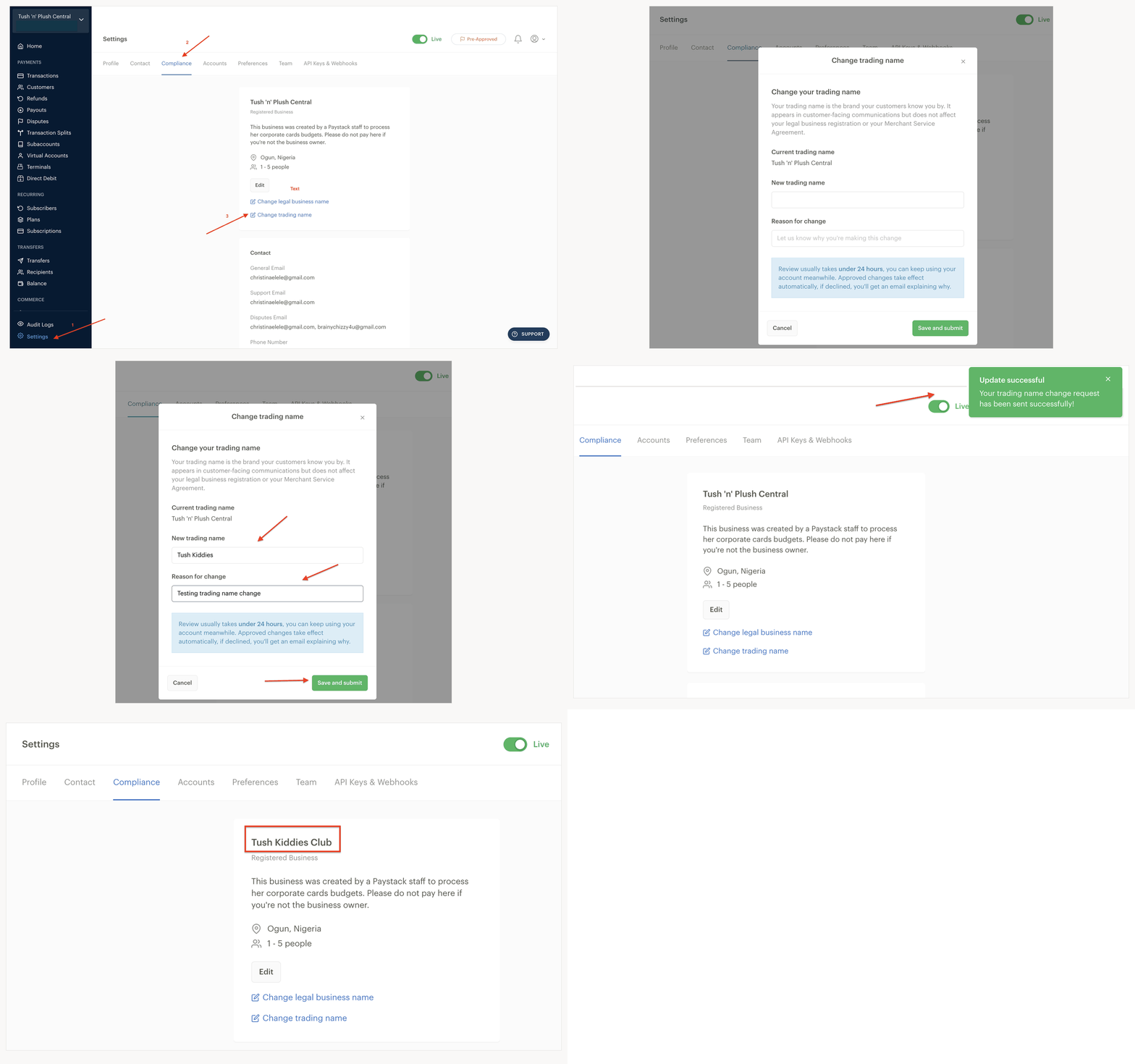
Review usually takes under 24 hours, and you can keep using your account while we review your request. If we approve it, your trading name updates automatically. If we decline it, we’ll email you with the reason. A proposed name may be declined if it conflicts with a trademark or isn’t connected to your business.
Updating your legal business name
Your legal business name is the name registered with the government authority in your country. It’s also tied to your MSA (Merchant service Agreement), so changing it requires document verification and a new agreement.
Preparing your documents
Have the following documents ready before you start:
An updated business registration document showing the new legal business name
Other registration document(s) that confirms it’s the same business, such as a document showing continuity of owners and directors
A corporate bank account whose name matches the one on your company registration documents
The documents requested may vary by country and registration type. Upload the documents listed in the Dashboard during the request.
Submitting your request
Log in to your Paystack Dashboard.
Go to Settings → Compliance.
Under your legal business name, click Change legal business name.
Read the document and MSA requirements, then click I understand, continue.
Enter your new legal business name and select a reason for the change.
Select your business registration type and the year the business was registered, then click Next.
Upload the registration and ownership documents shown for your business type, then click Next.
Review the new name, reason, registration type, and uploaded documents, then click Submit for review.
The Dashboard will confirm that we received your documents. Review typically takes 24–72 hours, and you can keep using your account while our Compliance team reviews them.
If we decline the request, we’ll email you with the reason. If we approve the documents, we’ll prompt you in the Dashboard or by email to sign a new MSA.
Sign the new MSA to complete the change.
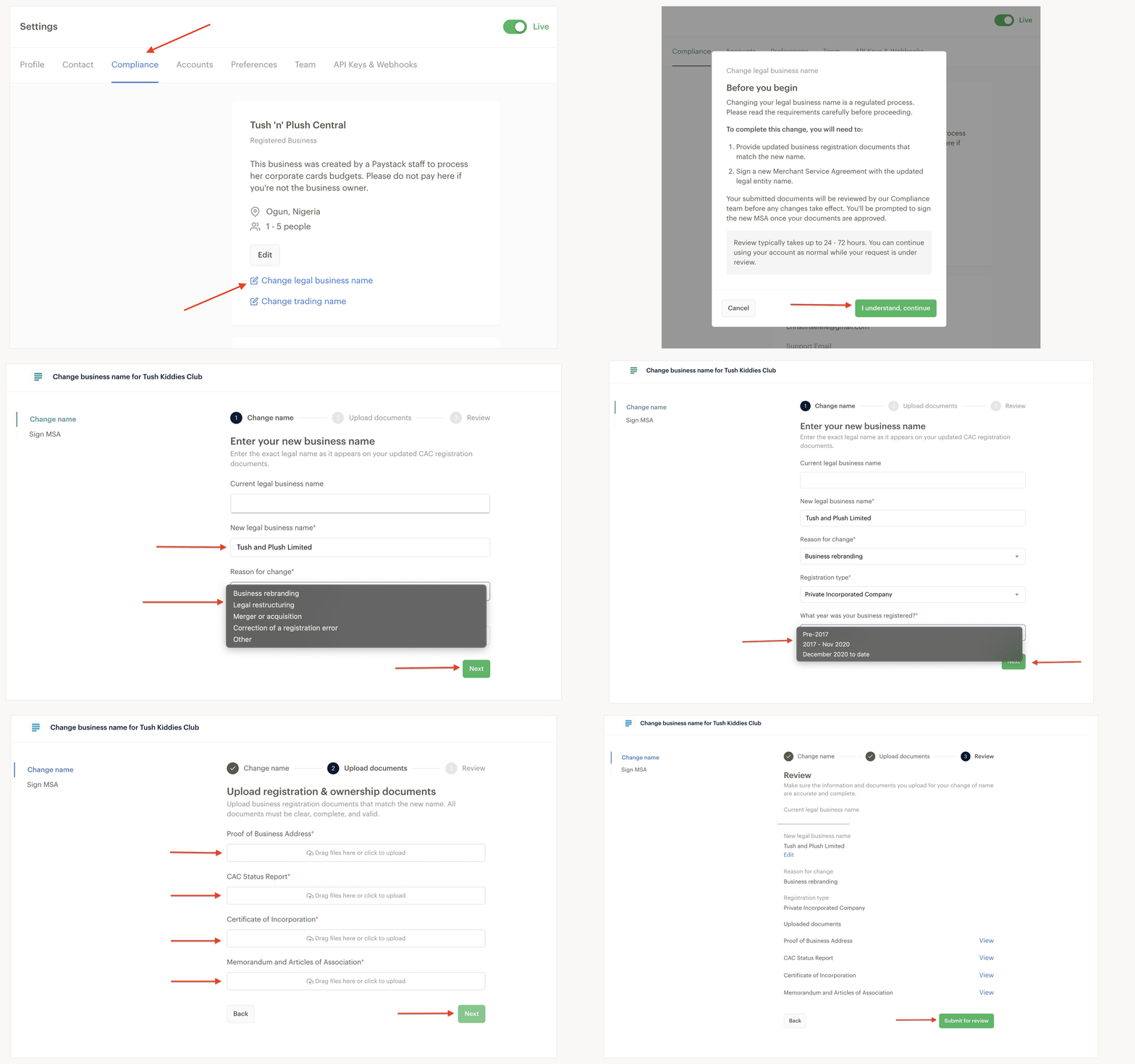
Your legal business name changes only after you sign the new MSA. We’ll preserve your previously signed MSA as part of your agreement history.
Tracking your request
You can return to Settings → Compliance to check the latest status of your request. While we review it:
Your Paystack account remains active, and you can continue accepting payments.
We’ll email you if we decline the request and explain why.
For an approved legal business name change, we’ll prompt you to sign a new MSA before completing the update.
Frequently asked questions
Can I update my trading name and legal business name at the same time?
Yes. They’re separate requests, but we recommend completing the legal business name change first so your business details stay aligned.
What happens if I don’t have registration documents for my new legal business name?
You’ll need to get the updated documents from the relevant registration authority before submitting your request. We can’t approve a legal name change without documents that show the new name and confirm that it’s the same business.
Will a business name change affect my payments or payouts?
You can continue accepting payments while we review your request. However, after a legal business name change, we may pause payouts if the name on your payout account doesn’t match your new legal business name. Add a corporate bank account with the matching name to resume payouts.
Can I complete a legal business name change before opening a matching corporate bank account?
Yes. You can submit the request and sign the new MSA first. However, we can’t pay out your funds until you provide a corporate bank account whose name matches your new legal business name.
Why can’t I see the option to change a business name?
Confirm that you’re a Business Owner or Admin and that there isn’t already a request of the same type in progress. If you still can’t see the option, contact our Support team.
What happens if my request is declined?
We’ll email you with the reason. You can correct the name or documents and submit a new request. If you need help understanding the decision, contact our Support team.
Getting help
Contact us through the in-app chat or email support@paystack.com. Include your Business ID and a screenshot of the issue so we can help you faster.